


BigCommerce to HubSpot CRM integration for clean lead and customer sync
Connect BigCommerce with HubSpot CRM to sync customers, orders, and marketing consent, so sales and lifecycle campaigns run on accurate data across Shopify-style automation and B2C workflows.








BigCommerce and HubSpot CRM integration in short
HubSpot's BigCommerce Data Sync app, listed at $0 for the integration, syncs BigCommerce customers with HubSpot contacts plus products and orders, with a historical sync at setup; orders arrive without line items, and custom field mappings need Data Hub Starter or higher. For order lines, deals, or abandoned cart data, use a connector such as MakeWebBetter's HubSpot app or build on HubSpot's Orders API with line item associations.


• BigCommerce customers are matched to HubSpot contacts using email as the primary identifier, with new contacts created when no match is found.
• Order events from BigCommerce are synchronized into HubSpot as ecommerce objects and are associated to the correct contact record for timeline and reporting continuity.
• Product and line-item identifiers are mapped so HubSpot revenue attribution can reference the same SKUs and item names used in BigCommerce.
• Delta-based synchronization sends only created or changed records after the initial backfill, reducing repeated writes and duplicate events.
• Optional field mappings pass address, phone, company, and marketing consent attributes into HubSpot contact properties with source-of-truth rules applied per field.
• Sync jobs log processed records, failures, and retries, and errors are surfaced with payload context to support troubleshooting and reprocessing.
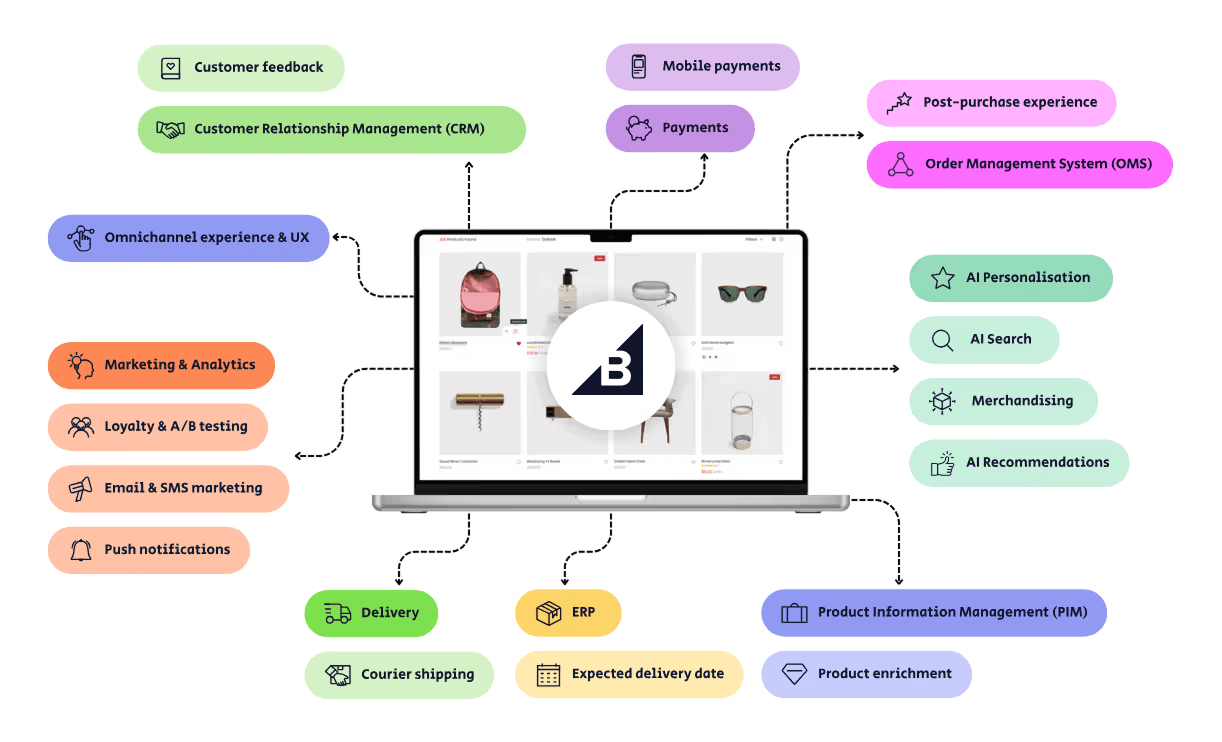
Ways to connect BigCommerce and HubSpot CRM
| Option | Type | Best for | Notes |
|---|---|---|---|
| HubSpot BigCommerce Data Sync | Native app | Contacts, products, and order headers in HubSpot with no custom code | Built by HubSpot. Syncs customers with contacts, products, and orders without line items; changes in either app are shared automatically and history syncs at setup. Default mappings are pre-built, custom mappings need Data Hub Starter or higher, and the listing's sync table does not include companies. |
| HubSpot Integration by MakeWebBetter | Connector | Sales teams that want each order as a deal, plus abandoned cart properties | Creates contacts, syncs each order as a deal with deal stages you define, syncs products, and adds abandoned cart properties. Priced by order volume: free for 50 orders a month, then $19, $99, and $199 a month for 100, 500, and unlimited orders. The listing says it may not be fully compatible with multi-storefront. |
| HubSpot Orders API | Custom API | Orders with line items, order status, and cart links in HubSpot | Creates orders and associates them with contacts (type 507), line items (513), and carts (593). Order pipelines can mirror BigCommerce statuses with stages such as Paid, Shipped, Cancelled, and Refunded. |
What syncs between BigCommerce and HubSpot CRM
| Data | Direction | System of record | Timing |
|---|---|---|---|
| Customers and contacts | Two-way | Set by data conflict resolution | Within 10 minutes of a change after the initial sync |
| Orders (header) | BigCommerce to HubSpot | BigCommerce | Automatic after the initial sync |
| Order line items | BigCommerce to HubSpot | BigCommerce | Only through a connector or the Orders API |
| Products | Synced with HubSpot products | BigCommerce | Automatic; HubSpot data sync matches by SKU or name |
| Deals from orders | BigCommerce to HubSpot | HubSpot deal pipeline | Through MakeWebBetter or custom workflows |
| Abandoned carts | BigCommerce to HubSpot | BigCommerce | Through MakeWebBetter properties or the Orders API cart association |
How a BigCommerce HubSpot CRM integration project runs
- Decide where order detail lives in HubSpot: order records without lines (Data Sync), deals (MakeWebBetter), or orders with line items (Orders API).
- Clean duplicate contacts and set matching: email for contacts, SKU or name for products.
- Install the chosen app and set sync direction and conflict resolution.
- Add custom mappings for BigCommerce customer fields; on HubSpot's app this needs Data Hub Starter or higher.
- Run the historical sync and compare order counts and totals with BigCommerce for the same period.
- Confirm multi-storefront support with the app vendor before launch if you run more than one storefront.
Common problems and how to avoid them
Orders arrive without line items
HubSpot's BigCommerce Data Sync app syncs orders without line items. Product-level reporting, cross-sell lists, and line-based workflows need a connector or the Orders API with line item associations.
No company sync in HubSpot's app
The listing's sync table covers customers, orders, and products only. B2B company records and account hierarchies need another route, such as the HubSpot API or a connector.
Custom fields need Data Hub
Default mappings come pre-built, but custom field mappings on HubSpot's app need Data Hub Starter or higher. Budget for it if you sync BigCommerce customer fields beyond the defaults.
Multi-storefront support varies
MakeWebBetter's listing says its app may not be fully compatible with multi-storefront and asks merchants with several stores to contact them for customization. Test with every storefront before go-live.
Initial sync can take days and restarts on save
HubSpot data sync's initial sync indexes existing records in both apps, which can take several days for syncs with millions of records, and saving changes to the sync restarts it. Finish mapping decisions before you start.
Why choose scandiweb to handle BigCommerce integration for you?
How do you sync BigCommerce customers and orders to HubSpot CRM without duplicates?
We map a single identity key (email or customer ID), align field rules, and enforce create-update logic with clear ownership per object. This keeps contacts, companies, and order-related properties consistent as data changes.
What BigCommerce data can be pushed into HubSpot CRM for segmentation and sales follow-up?
Typical sync includes contacts, order totals, last purchase date, product and category interests, abandoned cart signals, and marketing consent. We tailor the dataset to your pipeline and lifecycle workflows.
Can HubSpot CRM create deals from BigCommerce orders and attribute revenue to campaigns?
Yes, we can create or update deals based on order events and pass source data for reporting. This helps sales and marketing tie HubSpot campaigns to real BigCommerce revenue.
Does the BigCommerce HubSpot CRM integration support multi-storefront and international setups?
Yes, we can separate data by storefront, region, currency, and language using consistent naming and properties. It keeps reporting clean when you run multiple BigCommerce channels.
How long does a BigCommerce to HubSpot CRM integration take, and who builds it?
Timing depends on objects, custom fields, and middleware needs, but most builds move in weeks, not months. scandiweb has 22+ years in eCommerce delivery and 600+ specialists across engineering and data.
Is there an official HubSpot integration for BigCommerce?
Yes. HubSpot built the BigCommerce Data Sync app, listed at $0 for the integration itself, though you still need HubSpot and BigCommerce subscriptions.
Does the HubSpot BigCommerce app sync order line items?
No. HubSpot's listing says orders sync without line items. Use a connector or HubSpot's Orders API to add them.
Which HubSpot plan do I need for BigCommerce custom field mapping?
Data Hub Starter or higher. Default mappings work without it.
How quickly do BigCommerce changes reach HubSpot?
In HubSpot data sync, records update within 10 minutes of a change once the initial sync is done. An initial sync with millions of records can take several days.
Can HubSpot track BigCommerce order status like shipped or refunded?
Yes, with HubSpot's Orders object: order pipelines can hold stages such as Paid, Shipped, Cancelled, and Refunded, set through the Orders API.
Sources
- HubSpot Marketplace: BigCommerce Data Sync
- BigCommerce App Marketplace: HubSpot Integration by MakeWebBetter
- HubSpot developers: Orders API guide
- HubSpot Knowledge Base: Connect and use HubSpot data sync
- HubSpot Knowledge Base: Match records in data sync
Last updated by the scandiweb integration team.







HubSpot CRM integration on other platforms
More BigCommerce integrations
1. Submit your integration request
2. Join a free strategy & discovery call
We’ll review your business systems, identify key challenges, and uncover actionable opportunities.
3. Get a tailored proposal
Trusted by 700+ leading brands worldwide





