


BigCommerce integration with Microsoft Dynamics NAV for live orders and inventory sync
Connect BigCommerce with Microsoft Dynamics NAV (formerly Navision) to sync orders, customers, products, pricing, and inventory so your store and ERP stay aligned as you scale.








BigCommerce and Microsoft Dynamics NAV integration in short
BigCommerce and Dynamics NAV are usually connected through an integration platform such as Alumio, a connector vendor that also supports NAV (i95Dev lists NAV next to its Business Central app for BigCommerce), or a custom service that reads NAV's SOAP or OData web services and writes to BigCommerce's API. NAV 2018 extended support ends in January 2028, so build the BigCommerce side so it can be repointed at Business Central.


• Product records are mapped between Bigcommerce SKUs and Microsoft Dynamics NAV item numbers, with configurable field mapping for names, prices, barcodes, and tax classes.
• Inventory availability is synced per item and, when applicable, per location, with NAV treated as the inventory owner and Bigcommerce updated on a schedule or near-real-time triggers.
• Bigcommerce orders are exported to Microsoft Navision as sales orders, including customer, billing and shipping addresses, discounts, shipping method, taxes, and payment method references.
• Order line items are validated against NAV items and units of measure; unmatched SKUs, missing customers, and mapping errors are captured in an error queue with detailed logs.
• Shipment confirmations, tracking numbers, invoices, and order statuses are synchronized back to Bigcommerce so order history reflects NAV fulfillment progress.
• Delta-based sync logic sends only changed records where supported, reducing payload size and keeping retries idempotent to avoid duplicate orders or stock updates.
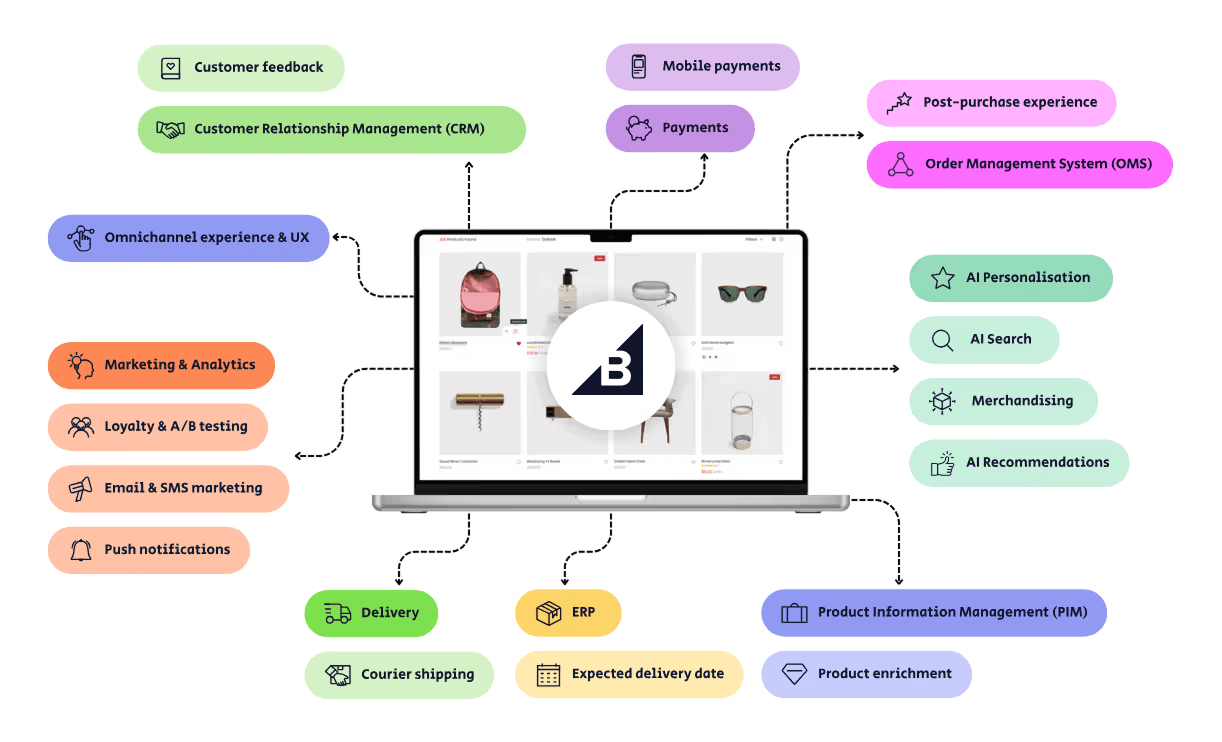
Ways to connect BigCommerce and Microsoft Dynamics NAV
| Option | Type | Best for | Notes |
|---|---|---|---|
| Alumio integration platform | Integration platform | NAV with flows managed outside both systems | Alumio's BigCommerce to NAV page lists orders, products, customers, inventory levels, prices, and status updates, run on events, on a schedule, or both. It does not name the NAV endpoint type, so confirm SOAP or OData access with your NAV partner. |
| i95Dev ERP integrations | Connector | Teams that want one vendor now and a Business Central path later | i95Dev's BigCommerce app is for Business Central, and its listing says the vendor also offers integrations for Dynamics NAV and Dynamics AX. Ask for the NAV scope in writing, because the listing's feature list describes Business Central. |
| Custom service on NAV web services | Custom API | Custom NAV objects, several companies, or market-specific posting rules | NAV publishes pages and codeunits as SOAP services and pages and read-only queries as OData. A small service between NAV and BigCommerce holds the mapping, queues, and retries. |
| Upgrade to Business Central first | Connector | Merchants already budgeting a NAV upgrade | Business Central has BigCommerce marketplace connectors and a REST API. NAV integrations built on standard pages need rework there, because Business Central is removing SOAP and OData publishing of Microsoft pages. |
What syncs between BigCommerce and Microsoft Dynamics NAV
| Data | Direction | System of record | Timing |
|---|---|---|---|
| Items and variants | NAV to BigCommerce | NAV | Scheduled batch |
| Sales prices and line discounts | NAV to BigCommerce | NAV | Scheduled; apply only date ranges valid today |
| Available stock | NAV to BigCommerce | NAV | Scheduled, more often than catalog data |
| Orders with payment references | BigCommerce to NAV | BigCommerce until the NAV sales order exists, then NAV | Queued after payment |
| Customers | BigCommerce to NAV | NAV for terms and posting groups | With each order |
| Shipments and tracking numbers | NAV to BigCommerce | NAV | Scheduled |
How a BigCommerce Microsoft Dynamics NAV integration project runs
- List the NAV version and the pages, codeunits, and queries already published as web services.
- Decide where integration logic runs: an integration platform, a connector vendor, or a small custom service.
- Expose NAV web services over HTTPS, not plain HTTP, even when access is limited by IP.
- Map items, prices, payment methods, shipping lines, and customer templates per market.
- Build delta syncs where NAV has a reliable change date, and add batching, timeouts, and retries elsewhere.
- Test refunds, partial shipments, and each payment method in a NAV test company before go-live.
- Document the mapping so it can move to Business Central APIs later.
Common problems and how to avoid them
Full catalog reads on every run
In a scandiweb audit of a multi-store NAV integration, the item change-date filter did not work in that setup and price changes did not update it, so each run read every item over SOAP. Adding one more storefront made runs fail after a few products. The fix list was a working change-date field, batched requests, timeouts, and retries with backoff.
Web services exposed over plain HTTP
The same audit found the NAV endpoint on HTTP and recommended HTTPS even though access was limited by IP. An eCommerce integration sends customer addresses and payment references, so encrypt the connection before go-live.
Dates and amounts parsed in the wrong culture
NAV interprets incoming web service data, including dates and amounts, using the server's Services Language setting, which defaults to en-us. Format dates and decimals in that one culture for every storefront and currency.
Shipping and gift cards need their own NAV lines
In a scandiweb NAV build, shipping posts as a G/L line chosen per store and gift card redemptions as negative G/L lines, and an unmapped payment or shipping code leaves the order unexported.
Standard NAV pages stop working as endpoints after the move
Business Central removes SOAP publishing of Microsoft pages in version 29 and OData publishing in version 30, and Business Central online accepts only OAuth. Plan custom API pages for every flow that reads a standard NAV page today.
Why choose scandiweb to handle BigCommerce integration for you?
How do I integrate BigCommerce with Microsoft Dynamics NAV (formerly Navision) for two-way order sync?
We map BigCommerce order, payment, tax, and shipping fields to NAV sales documents, then sync on a schedule or near real time. Status and tracking updates can be pushed back to BigCommerce for customer visibility.
Can BigCommerce pull real-time inventory from Microsoft Navision to prevent overselling?
Yes – inventory can sync by SKU, warehouse, and stock rules so BigCommerce shows accurate availability. We also handle backorders, safety stock, and low-stock thresholds when needed.
What product data can sync between BigCommerce and Microsoft Dynamics NAV, including variants and attributes?
Typical sync covers SKUs, variants, pricing, barcodes, and key attributes, plus category mapping. The exact payload depends on your NAV setup and how your catalog is structured in BigCommerce.
How do you handle pricing, discounts, and customer groups in a BigCommerce to Microsoft Dynamics NAV integration?
We align NAV price lists and customer pricing with BigCommerce price lists, promotions, or customer groups. Where native logic differs, we implement clear priority rules to avoid mismatched totals.
How long does a BigCommerce and Microsoft Dynamics NAV (formerly Navision) integration take to implement?
Most projects take weeks, not months, after requirements are confirmed and data is clean. Timeline depends on custom NAV objects, number of stores, and how many sync directions you need.
Is there a BigCommerce app for Dynamics NAV?
The Microsoft ERP apps we found in BigCommerce's ERP connector category are for Business Central and Dynamics 365 Finance and Supply Chain. For NAV, merchants use an integration platform such as Alumio, a vendor such as i95Dev that also supports NAV, or a custom service.
Can BigCommerce connect to an on-premises NAV server?
Yes, through middleware or a custom service that calls NAV's published web services over a secured connection, usually HTTPS with IP restrictions. BigCommerce itself does not connect to NAV directly.
Will a BigCommerce NAV integration still work after we move to Business Central?
Not unchanged. Business Central online requires OAuth, and Microsoft is removing SOAP and OData publishing of its standard pages in versions 29 and 30. Logic kept in middleware moves more easily than logic written into NAV objects.
Does Dynamics NAV support SOAP or OData?
Both. Pages and codeunits can be published as SOAP services, and pages and queries as OData, with queries read-only.
Is Dynamics NAV 2018 still supported?
NAV 2018 left mainstream support in January 2023. Extended support, which covers security updates, runs until January 2028.
Sources
- Alumio: BigCommerce and Microsoft Dynamics NAV
- BigCommerce App Marketplace: i95Dev Connect for Dynamics 365 Business Central
- BigCommerce App Marketplace: ERP cloud integrations and connectors
- Microsoft Learn: Dynamics NAV web services overview
- Microsoft Learn: Business Central deprecated platform features
- Microsoft Lifecycle: Dynamics NAV 2018
Last updated by the scandiweb integration team.






Microsoft Dynamics NAV integration on other platforms
More BigCommerce integrations
1. Submit your integration request
2. Join a free strategy & discovery call
We’ll review your business systems, identify key challenges, and uncover actionable opportunities.
3. Get a tailored proposal
Trusted by 700+ leading brands worldwide





